+
.com
USD
  • Account
  • Sign Up
  • Sign In
You have no items in your shopping cart.
ABOUT 1OUTLETS
Home Shopping Books Computers & Technology Hardware & DIY How to do Just About Anything on a Computer (Reader's Digest)
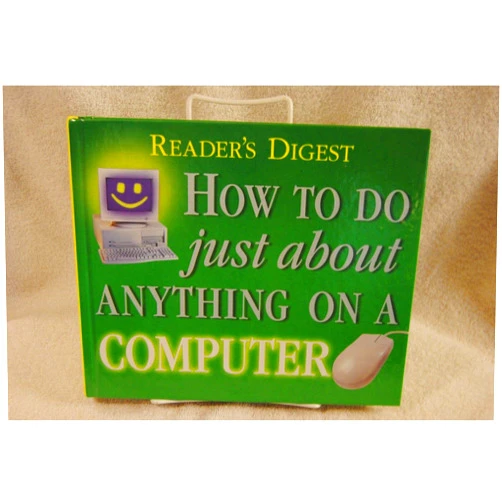
Editors of Reader's Digest How to do Just About Anything on a Computer (Reader's Digest)

Editors of Reader's Digest How to do Just About Anything on a Computer (Reader's Digest)

( 330 reviews ) See Reviews (1Outlets)

In stock *In Stock - Subject to stock availability at point of fulfilment. In the event whereby the item is out of stock or unable to provide the service, 1Outlets will cancel the order and issue a Full refund in-store credit to you. SKU : a0914b30ac7f4288afac2f68794431b6

USD8.65
  • Buy 2 for USD7.76 each and save 11%
  • Buy 10 for USD7.40 each and save 17%
Qty:

**Free Shipping Worldwide available - Shipping time may vary depending on the address.

**Circumstances Reroute - This is a time of great stress and uncertainty. We are actively validating, routing and re-routing orders with our overseas merchants, logistic partners and airlines. Deliveries and supply may expect delays.

**In Stock (Low Inventory Warning) - Subject to stock availability at point of fulfilment. In the event whereby the item is out of stock or unable to provide the service, 1Outlets will cancel the order and issue a Full refund in-store credit to you (See Refunds).

**Report or Request Removal  - Any copyrighted, DMCA, inappropriate, offensive, prohibited, potentially Illegal Listings (Submit doc here).

Details

Unlock Your Digital Potential

Unlock the power of your computer with Easy Computer Steps to Success**. Navigate the digital world with confidence and skill, and discover how much you can accomplish on your computer through this friendly guide.

How to do Just About Anything on a Computer (Reader's Digest) provides a comprehensive and straightforward guide to mastering computer skills. From basic navigation to complex tasks, this invaluable resource offers step-by-step instructions, designed for ease of understanding, making the often-intimidating world of computing accessible and enjoyable for everyone.

Main Features

  • Beginner-Friendly: Easy-to-follow instructions are geared towards novices with little or no prior computer experience.
  • Comprehensive Coverage: Addresses a wide range of tasks, covering everything from setting up an email account to creating presentations.
  • Visual Aids: Clear visuals and illustrations, enabling readers to understand the process effectively.
  • Practical Applications: The guide focuses on real-world scenarios, showcasing the practical uses of computer skills.
  • Up-to-date Information: Ensures the guide is relevant and addresses the most recent developments.

Benefits

  • Increased Productivity: Learn efficient strategies to complete tasks quickly and effectively.
  • Improved Confidence: Gain the confidence to use your computer with ease and mastery.
  • Enhanced Learning: Boost your learning curve in the digital space and develop new abilities.
  • Time Management: Master time management using your computer.
  • Expanded Opportunities: Open new avenues for personal and professional growth using digital tools.

Unique Selling Points / Competitive Advantages

  • Simplified Approach: The guide simplifies complex processes, making learning straightforward and engaging.
  • Actionable Steps: Includes practical steps with instructions to follow immediately.
  • Clear Language: Written using clear and simple language, ensuring effortless understanding for readers.
  • Wide Applicability: Suitable for a diverse range of readers and computer skills levels.
  • Uplifting Tone: Encourages readers and fosters a positive learning experience in the digital world.

Usage Scenarios

  • Students: Students can enhance their learning capabilities in educational tasks.
  • Professionals: Professionals can use this guide for improvement in their career.
  • Home Users: Improve everyday computer usage and tasks at home.
  • Seniors: Empower seniors to navigate computers and their capabilities.
  • Individuals: Perfect for anyone seeking to expand their digital literacy.

Customer Reviews / Testimonials

  • Maria Sanchez, Spain, 2023: "This book is amazing! It's so clear and easy to understand, even for someone who is not that tech-savvy. It has helped me a lot with my computer work."
  • David Lee, USA, 2022: "My grandma needed help using the computer for online banking. This guide was perfect for her! She quickly learned how to manage her finances online."
  • Aisha Khan, India, 2023: "I’m so happy with this book! It showed me all the hidden gems I didn't know the computer could do. I used it for creating presentations, and it was so useful. A great guide for everyday computer tasks!"

Frequently Asked Questions

  • Q: Is this book suitable for beginners? A: Absolutely! The guide is specifically crafted to be easy-to-understand for beginners.
  • Q: Does this book cover the latest computer software? A: Yes, the information provided is up-to-date to reflect the latest developments.
  • Q: Can I use this book on different types of computers? A: Most of the concepts are applicable across different computer systems.
  • Q: What kind of computer tasks does this book cover? A: It covers a broad range of everyday tasks, allowing you to understand your computer better.
  • Q: Is this guide suitable for people of all ages? A: This guide is designed to be suitable for people of all ages and skill levels, making it a resource for everyone.

BUY NOW

Acquire Reader's Digest's How to do Just About Anything on a Computer and accelerate your digital journey today. Transform your computer skills and unlock a world of possibilities.

(Beta: User Generated 2024.0007)
Specification
Category: Books > Computers & Technology > Hardware & DIY
Weight: 1.36077711kgs
Language: English
ISBN-13: 978-0276424359
Terms & Warning