+
.com
USD
  • Account
  • Sign Up
  • Sign In
You have no items in your shopping cart.
ABOUT 1OUTLETS
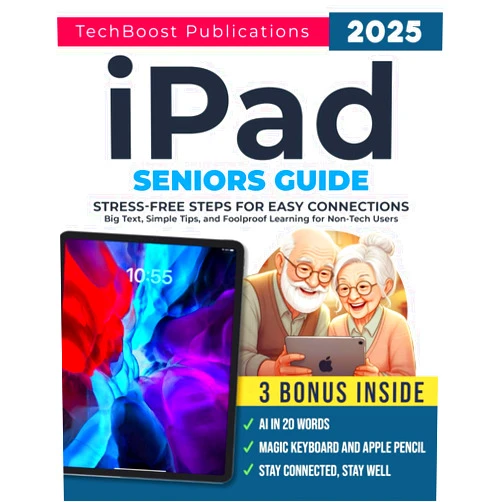
Home Shopping Books Computers & Technology Mobile Phones, Tablets & E-Readers iPad Seniors Guide: Stress-Free Steps for Easy Connections: Big Text, Simple Tips, and Foolproof Learning for Non-Tech Users (Easy Tech Guides for Seniors)
TechBoost Publications iPad Seniors Guide: Stress-Free Steps for Easy Connections: Big Text, Simple Tips, and Foolproof Learning for Non-Tech Users (Easy Tech Guides for Seniors)

TechBoost Publications iPad Seniors Guide: Stress-Free Steps for Easy Connections: Big Text, Simple Tips, and Foolproof Learning for Non-Tech Users (Easy Tech Guides for Seniors)

( 116 reviews ) See Reviews (1Outlets)

In stock *In Stock - Subject to stock availability at point of fulfilment. In the event whereby the item is out of stock or unable to provide the service, 1Outlets will cancel the order and issue a Full refund in-store credit to you. SKU : 81cb9ea1d9c9ce020c12bae1730e691c

USD11.54
  • Buy 2 for USD11.23 each and save 3%
  • Buy 10 for USD10.75 each and save 7%
Qty:

**Free Shipping Worldwide available - Shipping time may vary depending on the address.

**Circumstances Reroute - This is a time of great stress and uncertainty. We are actively validating, routing and re-routing orders with our overseas merchants, logistic partners and airlines. Deliveries and supply may expect delays.

**In Stock (Low Inventory Warning) - Subject to stock availability at point of fulfilment. In the event whereby the item is out of stock or unable to provide the service, 1Outlets will cancel the order and issue a Full refund in-store credit to you (See Refunds).

**Report or Request Removal  - Any copyrighted, DMCA, inappropriate, offensive, prohibited, potentially Illegal Listings (Submit doc here).

Details

TechBoost Publications: Conquer the digital world, one tap at a time!

Discover the joy of connecting with loved ones and the world around you with iPad Seniors Guide: Stress-Free Steps for Easy Connections. This friendly guide uses big, clear text, simple explanations, and foolproof learning methods to make iPad mastery a breeze for even the most tech-shy seniors. Learn at your own pace, with easy-to-follow instructions that will have you confidently navigating your iPad in no time.

Main Features

  • Big, easy-to-read text: Ensures comfortable viewing for all ages and vision levels.
  • Simple, step-by-step instructions: Clear and concise guidance makes learning straightforward.
  • Real-world examples and illustrations: Visual aids clarify complex concepts and make learning engaging.
  • Focus on essential functions: Concentrates on the most useful iPad features for seniors.
  • Foolproof learning approach: A simple method designed to ensure success for everyone.

Benefits

  • Increased connection with family and friends: Stay in touch easily using email, video calls, and social media.
  • Enhanced independence and confidence: Mastering the iPad empowers seniors to explore new horizons.
  • Access to information and entertainment: Enjoy news, books, games, and more at your fingertips.
  • Improved cognitive function: Learning new technology can keep the mind active and sharp.
  • Greater engagement in the digital world: Participate fully in modern life and overcome digital barriers.

Unique Selling Points / Competitive Advantages

  • Specifically designed for seniors: Addresses the unique needs and challenges faced by older adults learning technology.
  • Stress-free learning approach: Reduces anxiety and promotes a positive learning experience.
  • Clear and concise language: Avoids technical jargon and complicated explanations.
  • Visually engaging design: Makes learning fun and enjoyable.
  • Comprehensive coverage of essential features: Offers a complete introduction to the key functionalities of the iPad.

Usage Scenarios

  • Connecting with family members through video calls: Easily stay in touch with loved ones across distances.
  • Accessing news and current events: Stay informed about the world around you.
  • Using email to communicate with friends: Maintain relationships and build community.
  • Browsing photos and videos: Relive cherished memories and share them with others.
  • Playing simple games and puzzles: Enjoy recreational activities that stimulate the mind.

Customer Reviews / Testimonials

  • "This guide is a lifesaver! I finally feel confident using my iPad." – Margaret S., Canada, 2023
  • "The simple instructions made all the difference. I recommend this to anyone." – John B., UK, 2022
  • "The big text and clear pictures were perfect for my aging eyes." – Eleanor P., Australia, 2024
  • "This book helped my grandmother connect with her grandchildren via video call." – David L., USA, 2023
  • "I love how this easy tech guide focuses on what matters most to seniors." – Patricia M., Ireland, 2024

Frequently Asked Questions (with answers)

  • Q: Is this guide suitable for complete beginners? A: Absolutely! It's designed for those with no prior experience using an iPad.
  • Q: How long does it take to learn from this guide? A: The pace is entirely up to you. Learn at your own speed and comfort.
  • Q: What if I get stuck? A: The guide provides clear instructions and simple troubleshooting steps.
  • Q: Does this cover all iPad functions? A: It focuses on the most essential and commonly used features for seniors.
  • Q: Is the guide visually appealing? A: Yes, it uses a visually engaging design and plentiful visuals for easy understanding.

BUY NOW

Master your iPad with TechBoost Publications' easy-to-follow guide. Experience the joy of effortless connection, and confidently navigate the digital world – one simple step at a time. Embrace technology and enhance your life!

(Beta: User Generated 2024.0007)
Specification
Category: Books > Computers & Technology > Mobile Phones, Tablets & E-Readers
Weight: 0.28066027869kgs
Language: English
ISBN-13: 979-8305862775
Terms & Warning