+

In stock *In Stock - Subject to stock availability at point of fulfilment. In the event whereby the item is out of stock or unable to provide the service, 1Outlets will cancel the order and issue a Full refund in-store credit to you. SKU : 15c02239d831179b12b0747a0be3326e
**Free Shipping Worldwide available - Shipping time may vary depending on the address.
**Circumstances Reroute - This is a time of great stress and uncertainty. We are actively validating, routing and re-routing orders with our overseas merchants, logistic partners and airlines. Deliveries and supply may expect delays.
**In Stock (Low Inventory Warning) - Subject to stock availability at point of fulfilment. In the event whereby the item is out of stock or unable to provide the service, 1Outlets will cancel the order and issue a Full refund in-store credit to you (See Refunds).
**Report or Request Removal - Any copyrighted, DMCA, inappropriate, offensive, prohibited, potentially Illegal Listings (Submit doc here).
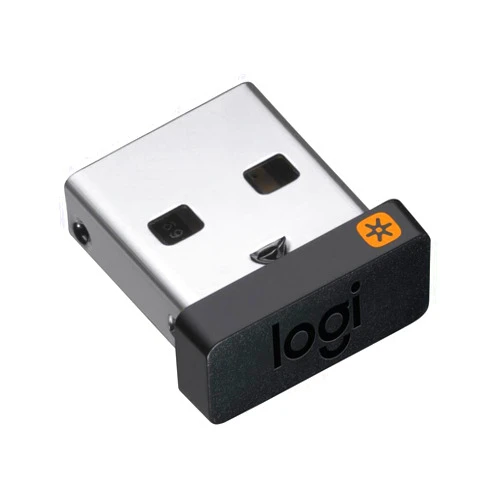
The Logitech Unifying Receiver is your key to a clutter-free, high-performance computing experience. This tiny yet mighty 2.4 GHz wireless receiver effortlessly connects with all your favorite Logitech Unifying devices, including wireless mice and keyboards, providing a seamless and reliable connection for both PC and Mac computers. Experience the freedom of wireless technology without the hassle of multiple receivers. Enjoy the simplicity and reliability this receiver offers, making your computing experience truly enjoyable.
Q: How many Logitech Unifying devices can I connect to one receiver?
A: You can connect up to six Logitech Unifying devices to a single receiver.
Q: Is this receiver compatible with all wireless Logitech devices? A: No, it's compatible only with Logitech Unifying devices. Look for the Unifying logo on your device.
Q: Is the receiver compatible with my operating system? A: The Logitech Unifying Receiver is compatible with Windows and macOS.
Q: Does this receiver require drivers to be installed? A: Most operating systems will automatically recognize and install the necessary drivers.
Q: How do I connect a device to the receiver? A: Simply plug the receiver into your computer's USB port and then pair your Unifying device following its instructions.
Experience the freedom and simplicity of the Logitech Unifying Receiver – upgrade your tech today for a seamless, reliable wireless connection that empowers your productivity and elevates your daily computing experience. Enjoy the connection, enjoy Logitech!
(Beta: User Generated 2024.0007)