+

In stock *In Stock - Subject to stock availability at point of fulfilment. In the event whereby the item is out of stock or unable to provide the service, 1Outlets will cancel the order and issue a Full refund in-store credit to you. SKU : dc39b4a3e203d7221ddf07af6211b796
**Free Shipping Worldwide available - Shipping time may vary depending on the address.
**Circumstances Reroute - This is a time of great stress and uncertainty. We are actively validating, routing and re-routing orders with our overseas merchants, logistic partners and airlines. Deliveries and supply may expect delays.
**In Stock (Low Inventory Warning) - Subject to stock availability at point of fulfilment. In the event whereby the item is out of stock or unable to provide the service, 1Outlets will cancel the order and issue a Full refund in-store credit to you (See Refunds).
**Report or Request Removal - Any copyrighted, DMCA, inappropriate, offensive, prohibited, potentially Illegal Listings (Submit doc here).
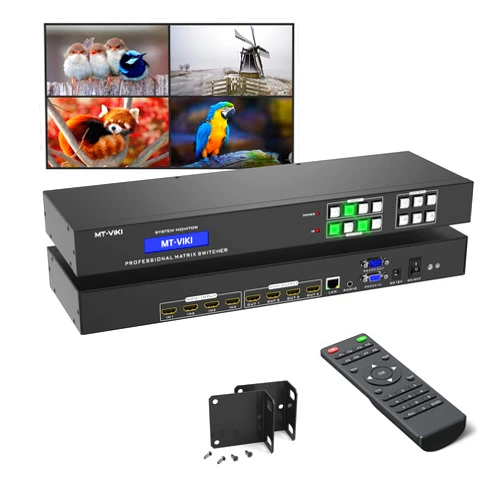
The ** MT-VIKI 4K HDMI Matrix Switch is a powerful and versatile device that seamlessly connects and manages multiple sources to multiple displays, providing a crystal-clear 4K experience. This versatile HDMI matrix switcher allows you to effortlessly switch between four different input sources, including your gaming consoles, Blu-ray players, and streaming devices, with a single remote control. The MT-VIKI 4K HDMI Matrix Switch is perfect for home theater enthusiasts, and educational or business settings needing a versatile and easy-to-use video matrix** solution.
Q: How do I connect multiple sources using the HDMI matrix? A: Connect each device to one of the HDMI inputs and select your desired output display.
Q: Can I control the MT-VIKI from my smartphone? A: Yes, the Web GUI allows remote control and setup through a standard web browser.
Q: Is the stereo audio extractor necessary? A: Yes, separate audio from video for the best possible sound quality in your setups.
Q: Does this HDMI matrix support other resolutions besides 4K? A: Yes, including 1080p.
Q: How do I troubleshoot connection issues? A: Consult the user manual and search for relevant tutorials online.
Upgrade your entertainment experience with the MT-VIKI 4K HDMI Matrix Switch.
(Beta: User Generated 2024.0007)