+
.com
USD
  • Account
  • Sign Up
  • Sign In
You have no items in your shopping cart.
ABOUT 1OUTLETS
Home Shopping Other Texas Instrument Nspire CX II CAS Student Software Graphing Calculator
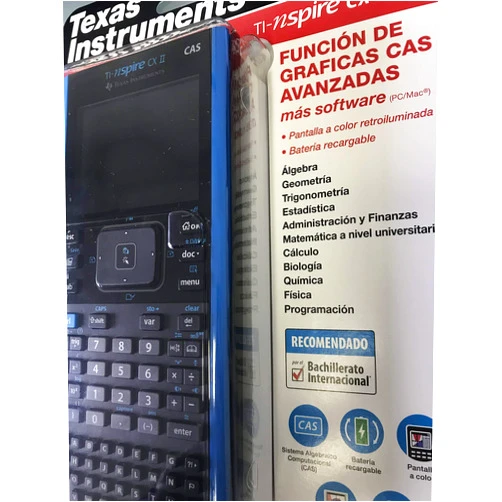
Texas Instruments Texas Instrument Nspire CX II CAS Student Software Graphing Calculator

Texas Instruments Texas Instrument Nspire CX II CAS Student Software Graphing Calculator

( 415 reviews ) See Reviews (1Outlets)

In stock *In Stock - Subject to stock availability at point of fulfilment. In the event whereby the item is out of stock or unable to provide the service, 1Outlets will cancel the order and issue a Full refund in-store credit to you. SKU : de69f44f77851ead4fc958e60b72d23d

USD86.60
  • Buy 2 for USD86.29 each and save 0%
  • Buy 10 for USD85.87 each and save 1%
Qty:

**Free Shipping Worldwide available - Shipping time may vary depending on the address.

**Circumstances Reroute - This is a time of great stress and uncertainty. We are actively validating, routing and re-routing orders with our overseas merchants, logistic partners and airlines. Deliveries and supply may expect delays.

**In Stock (Low Inventory Warning) - Subject to stock availability at point of fulfilment. In the event whereby the item is out of stock or unable to provide the service, 1Outlets will cancel the order and issue a Full refund in-store credit to you (See Refunds).

**Report or Request Removal  - Any copyrighted, DMCA, inappropriate, offensive, prohibited, potentially Illegal Listings (Submit doc here).

Details

Texas Instruments: Explore. Discover. Conquer.

Texas Instruments Nspire CX II CAS Student Software Graphing Calculator is the ultimate tool for young minds eager to explore the exciting world of mathematics and science! This powerful, user-friendly graphing calculator empowers students to visualize complex concepts, solve intricate problems, and achieve academic success with confidence. Unlock your potential and embark on a journey of discovery with the Texas Instruments Nspire CX II CAS Student Software Graphing Calculator.

Main Features

  • Color Display: Brighten your learning experience with a vibrant, high-resolution color screen that brings graphs and equations to life.
  • CAS Functionality: Dive into the power of Computer Algebra System (CAS), enabling you to manipulate symbols, solve equations algebraically, and explore mathematical concepts at a deeper level.
  • Interactive Geometry: Construct, explore, and analyze geometric figures with ease, fostering a dynamic understanding of shapes and their properties.
  • Intuitive Interface: Navigate seamlessly through menus and functions with an easy-to-use interface designed for students of all levels.
  • Pre-loaded Apps: Access a library of built-in applications, including spreadsheets, data & statistics, and more, to analyze and interpret data in multiple ways.

Benefits

  • Improved Understanding: Visualize mathematical concepts and grasp them with greater clarity, leading to deeper comprehension.
  • Enhanced Problem-Solving: Tackle complex problems with confidence using the advanced functionalities of the graphing calculator.
  • Increased Engagement: Immerse yourself in learning with the interactive features that make math and science fun and exciting.
  • Boosted Confidence: Achieve academic success and build confidence in your abilities through effective learning.
  • Preparation for Future Success: Equip yourself with the skills and knowledge needed for advanced studies and beyond, setting the stage for future accomplishments.

Unique Selling Points / Competitive Advantages

  • Symbolic Manipulation: The CAS capability allows for symbolic computations, enabling students to work with variables and equations in a sophisticated manner.
  • Versatile Applications: A wide range of applications from graphing to spreadsheets, promoting all-around skills.
  • Interactive Learning: Encourage experimentation and understanding through the interactive nature of the graphing calculator.
  • User-Friendly Design: The interface ensures that students can focus on the learning and not getting confused by complex navigation.
  • Student-Focused Design: Built from the ground up with student needs in mind, this calculator will make learning easier.

Usage Scenarios

  • Classroom Learning: Use the calculator during lectures, demonstrations, and in-class exercises to follow along and visualize concepts.
  • Homework Assignments: Complete homework assignments efficiently and accurately, using the advanced features to solve problems.
  • Exam Preparation: Practice for exams by solving practice problems and reviewing key concepts with the aid of the calculator.
  • Science Experiments: Analyze data, graph results, and explore scientific concepts using the calculator's statistical and graphing capabilities.
  • Independent Study: Explore topics independently, experiment with different approaches, and deepen your understanding with the help of the calculator.

Customer Reviews / Testimonials

  • Sophia, Italy (2023): "The Texas Instruments Nspire CX II CAS has completely transformed the way I learn math! I can finally see what's happening and it makes solving problems so much easier."
  • Kenji, Japan (2022): "The CAS system is fantastic! I can now understand the algebra with this calculator. The color screen is amazing."
  • Maria, Brazil (2023): "It is a great graphing calculator that's truly helped me. I appreciate the ease of use!"
  • Aisha, Egypt (2022): "I use the Texas Instruments Nspire CX II CAS Student Software Graphing Calculator to solve every problem. It's the best calculator ever!"
  • David, Canada (2023): "I love the interactive graphing on the Texas Instruments. This is such a great tool for me. I can easily visualize all the topics."

Frequently Asked Questions (with answers)

  • Q: Is the Texas Instruments Nspire CX II CAS allowed in exams? A: It often is, but check your specific exam's guidelines to confirm.
  • Q: Does it come with a rechargeable battery? A: Yes, the calculator features a rechargeable battery for your convenience.
  • Q: Can I download additional applications? A: While there is a built-in library, you cannot download extra apps.
  • Q: Is it easy to transfer files to and from a computer? A: Yes, with the right software, you can transfer files easily.
  • Q: Does it have a help menu? A: Yes, there is a helpful built-in manual to aid in learning the calculator.

BUY NOW

Texas Instruments Nspire CX II CAS Student Software Graphing Calculator: Ignite your passion for math and science, explore captivating concepts, conquer challenging problems, and begin your journey towards a brighter future with the help of this essential tool.

(Beta: User Generated 2024.0007)
Specification
Category: Other
Weight: 0.30617484948kgs
Height: 0.10160000000000001cm
Length: 27.94cm
Item model number: 8541735639
Terms & Warning